



Procore Partner Experience
Company: Procore Technologies
Role: Staff Product Designer
Type: Web
Project Description
The Procore Ecosystem is made up of three products that are deeply connected to each other: The Procore Marketplace, The Procore Developer Portal and the Procore App Administration area. Customer acquisition and retention is directly related to the ability to extend the Procore platform into specialty contract areas. The Ecosystem product team set out to establish a three to five-year vision, build a roadmap of iterative releases, and start building the solution.
Goal (Customer JTBD)
Procore customers want to track all of their construction work in one system to effectively utilize consolidated data, pay fewer software fees, and administer fewer systems so they can finish their construction projects on time and on budget.
The Problem
The Ecosystem was built quickly on the heels of a hackathon in an effort to quickly provide a framework for app creation. Over time, through direct research, user feedback and internal employee feedback, we learned that the Ecosystem was lacking in several areas and impacting our customers' ability to easily extend their Procore installation where they needed.
My Role
As the staff product designer in the Ecosystem Division, it was my responsibility to represent the users and customers in strategy and prioritization conversations and to perform all facets of product design from research to delivery.
Stakeholder Map
As a newcomer to the environment, I needed to understand who we would be impacted through our work. I facilitated a stakeholder, affinity mapping exercise with the entire team.
The exercise showed that we had three main user archetypes:
-
Customers (App Users)
-
Partners (App Creators)
-
Integration Managers (Procore Support)

Journey Map
I created a journey map in order to identify the workflow for partners to propose an app to the Procore Marketplace. The map revealed pain points for our 3 main user types that we then added to our vision story.
The journey map was based on:
-
Interviews with Partners done with the product manager (10)
-
Focus group with the Integration Managers
-
UserVoice user feedback
-
Heuristic evaluation
-
Interviews with Procore salespeople (2)

Key Takeaways from the Research
-
Apps take from 1 week to 3 months to get approved
-
There are 44 steps during the app approval process for PIMs
-
Most of the issues stem from a poor development process with a lack of information
Vision Story
Together with the product manager, I compiled the research that we had about our users and stakeholders and wrote a story that compared the as-is experience to a vision of what the ecosystem could be in three to five years. The story was presented to the executive leadership team for approval and became our "Northstar" direction for the team.


Getting to Work
Knowing the Users
I created personas for our top stakeholders to understand their jobs to be done and the pain they were feeling.


We found that many of the problems that the users were having stemmed from the difficulties encountered during the creation of the app in the development portal. Improving the development process was the highest impact, lowest effort project to tackle.
The Challenge
The key was to be able to incrementally change the developer portal along the path to the northstar vision without creating debt.
Usability Testing
In order to validate our research about users and stakeholders, make sure that we were attacking the most important issue, and establish baseline metrics, I facilitated 5, one-hour, open-ended usability tests with internal developers. The research not only validated our assumptions but also brought to light new insights that we were previous unaware of.
Existing Intended Path
The existing developer portal offers the user documentation that then is supposed to help step through the process, but after testing 5 users, it was apparent that every user was taking a very different, unguided path.
The intended path tries to move the user from document to action and repeats.

Actual User Path
Each user tested took a completely different path to either a painstaking success, or failure as in this case. Much of the confusion for all users took place trying to edit the manifest code.

Focus: Form-based Manifest
While creating the app, the users stumbled the most on creating the manifest. We decided to focus on the manifest creation experience and remove the need to edit, copy, and paste code into an editor.
The existing manifest creation modal was difficult to understand and use.

Architecture and Discovery
After deciding that the project was going to redesign the manifest creation flow to be form-based, we held several architectural meetings to discover our technical constraints and start designing the solution with the entire team.
In the first several meetings, we discussed the architecture and constraints.

We then discussed the intended user flow.

User Flows
Taking the information from our user flow meetings, I started to create possible experiences and we discussed each with the team.

Low/Medium Fidelity Prototyping
Using a low fidelity library in Figma, I prototyped the interface so we could walk through what the user would experience. I chose low fidelity so that we wouldn't get caught up talking about the finer details of design I created 7 different iterations and reviewed with the Product Manager. We reviewed three of them with the whole team and I walked stakeholders through our ideas for validation.
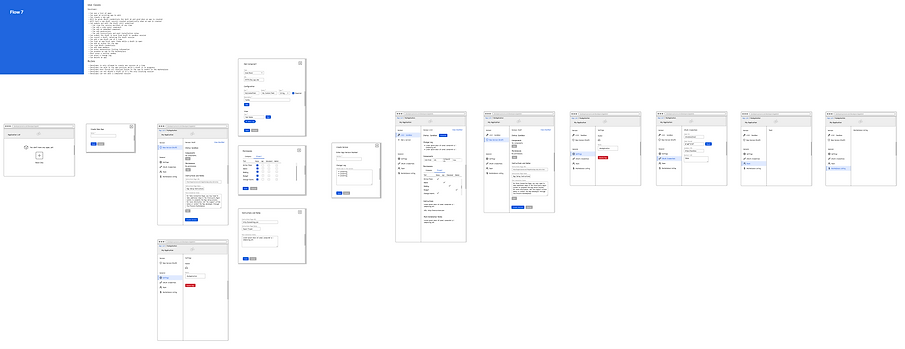
Hi-Fi Prototyping with Design System Components
Using our design system components, I turned the interface into a high fidelity prototype to show the full user experience. The experience was reviewed by all stakeholders and usability testing is scheduled to begin soon. The team is using this wireframe to build out the experience, discussing interactions and iterating along the way in agile fashion.

First Incremental Release
With the changes we made to the developer app creation interface, a user now has an entirely form-based experience. They no longer need to edit code and navigate documents to find what they need. We were able to keep parity with the old system and introduce a mutable app version to eliminate excess version creation.
